EN / USD
Language
English
  • Yoruba
  • Basa Jawa
  • Bahasa Indonesia
  • Basa Sunda
  • नहीं।
  • יידיש
  • Igbo
  • Hայերեն
  • Magyar
  • Ελληνικά
  • עִברִית
  • o'zbek
  • український
  • اردو
  • Cymraeg
  • Türk
  • தமிழ்
  • తెలుగు
  • тоҷикӣ
  • Soomaali
  • Cebuano
  • Kiswahili
  • Slovenščina
  • Slovenský
  • Esperanto
  • සිංහල
  • Sesotho
  • Српски
  • Svenska
  • Chichewa
  • ਪੰਜਾਬੀ
  • Norsk
  • नेपाली
  • Zulu
  • Hmoob
  • বাংলা
  • Монгол
  • Maori
  • македонски
  • മലയാളം
  • मराठी
  • Malti
  • Malagasy
  • Română
  • Lietuvių
  • ພາສາລາວ
  • Latviski
  • Latinus
  • Hrvatski
  • ಕನ್ನಡ
  • čeština
  • Català
  • Galego
  • Nederlands
  • Hausa
  • Kreyòl ayisyen
  • қазақ
  • ગુજરાતી
  • ქართული
  • ខ្មែរ
  • Suomalainen
  • Filipino
  • Dansk
  • Afrikaans
  • فارسی
  • Bosanski
  • íslenskur
  • български
  • беларуская
  • Euskara
  • Eesti keel
  • Gaeilge
  • Azərbaycan
  • عربي
  • Shqiptare
  • Polskie
  • Bahasa Melayu
  • Tiếng Việt
  • ไทย
  • ဗမာ
  • 한국어
  • Italiano
  • 简体中文
  • 繁體中文
  • Português
  • Русский
  • Español
  • Français
  • Deutsch
  • 日本語
  • English
Currency
USD (US Dollar)
  • USD (US Dollar)
  • GBP (Pound Sterling)
  • EUR (Euro)
  • AUD (Australian Dollar)
Save
Home > Blog > Product News & Updates > Zemismart KES-606US-L1 Update: Now Supports Normal Switch and Scene Switch Modes

Zemismart KES-606US-L1 Update: Now Supports Normal Switch and Scene Switch Modes

By Zemismart December 3rd, 2025 38 views

Zemismart KES-606US-L1 Upgrade: Set It as a Normal Switch or Scene Switch

As smart lighting becomes more popular, many users are no longer using wall switches only to turn a light on or off. Smart bulbs, smart downlights, LED strips, and lighting scenes all need one important thing: continuous power.

That is why we have upgraded the Zemismart KES-606US-L1 Zigbee Neutral Push Switch. In addition to working as a traditional smart wall switch, it can now be set as a Scene Switch in the Tuya app.

This update gives users more flexibility for modern smart lighting setups.


What Was Changed?

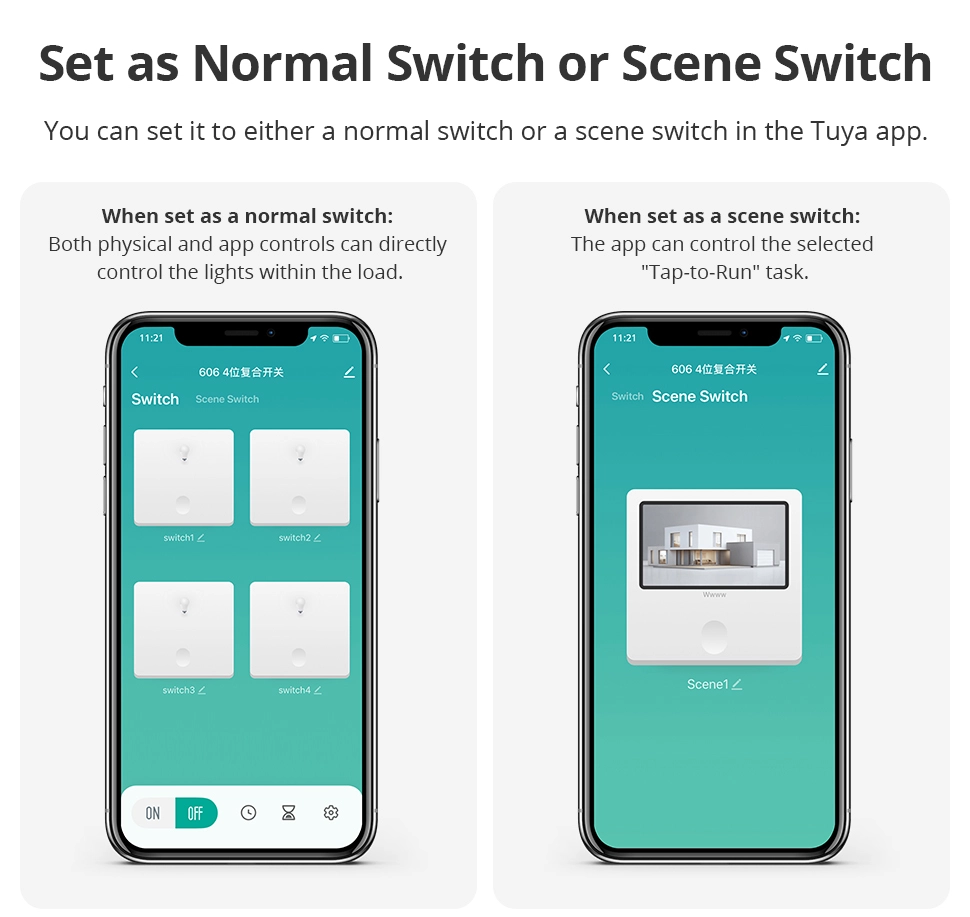
Previously, the switch worked mainly as a normal on/off switch. Both the physical button and app control could directly control the connected light load.

With the new update, users can choose between two modes:

Normal Switch Mode
The switch works like a standard smart wall switch. Physical button control and app control can turn the connected light on or off.

Scene Switch Mode
The switch can be used to trigger a Tuya “Tap-to-Run” scene. When used as a scene switch, pressing the switch can activate preset smart home actions without physically cutting power to the smart light.

This is especially useful for smart bulbs and smart lights that need to stay powered in order to remain online and controllable.


Why Scene Switch Mode Matters

In many smart homes, users install smart bulbs or smart lighting fixtures behind a traditional wall switch. The problem is simple: if the wall switch cuts the power, the smart light goes offline.

Once offline, the light can no longer respond to app control, voice control, automation, or scheduled scenes.

With Scene Switch Mode, the KES-606US-L1 can help solve this problem. The switch can remain part of the smart home control system while keeping the smart light powered. Instead of disconnecting the circuit, the button can be used to trigger scenes such as:

  • Turn on multiple smart lights
  • Adjust brightness
  • Change color temperature
  • Activate movie mode
  • Turn off all lights in a room
  • Run a bedtime or away-home automation

This makes the switch more suitable for homes where smart lighting is already installed or where users plan to upgrade from traditional lighting to smart lighting.


Better Flexibility for Different Homes

Not every room needs the same control method. Some users still prefer a direct wall switch for regular lights. Others want a scene controller for smart bulbs and automation.

With this upgrade, one product can support both needs.

For traditional lighting, use it as a normal switch.
For smart lighting scenes, set it as a scene switch.

This gives installers and homeowners more freedom when designing a smart home system.


Product Compatibility

The Zemismart KES-606US-L1 is a Zigbee neutral push button wall switch available in 1, 2, 3, and 4 gang options, with white and black versions. It works with Tuya via Tuya Zigbee, and can also work with platforms such as Apple Home/HomeKit via Zemismart Zigbee hub, SmartThings via hub, Alexa, and Google Home depending on the connected gateway and setup.


A Small Upgrade, A More Smart-Home-Friendly Switch

This update is designed for the way people use smart homes today. A wall switch should not only control power. It should also work naturally with smart lights, scenes, and automations.

With the new Normal Switch and Scene Switch settings, the Zemismart KES-606US-L1 becomes more flexible, more practical, and better suited for modern smart lighting systems.

Explore the upgraded KES-606US-L1 here:
Zemismart KES-606US-L1 Zigbee Neutral Push Switch

Previous
How to Choose the Right Zemismart Roller Shade Motor in 3 Minutes
Read More
Next
ZML3 Firmware Upgrade: Power Recovery Now Restores Previous On/Off State
Read More